
Last updated on
Oct 31, 2026
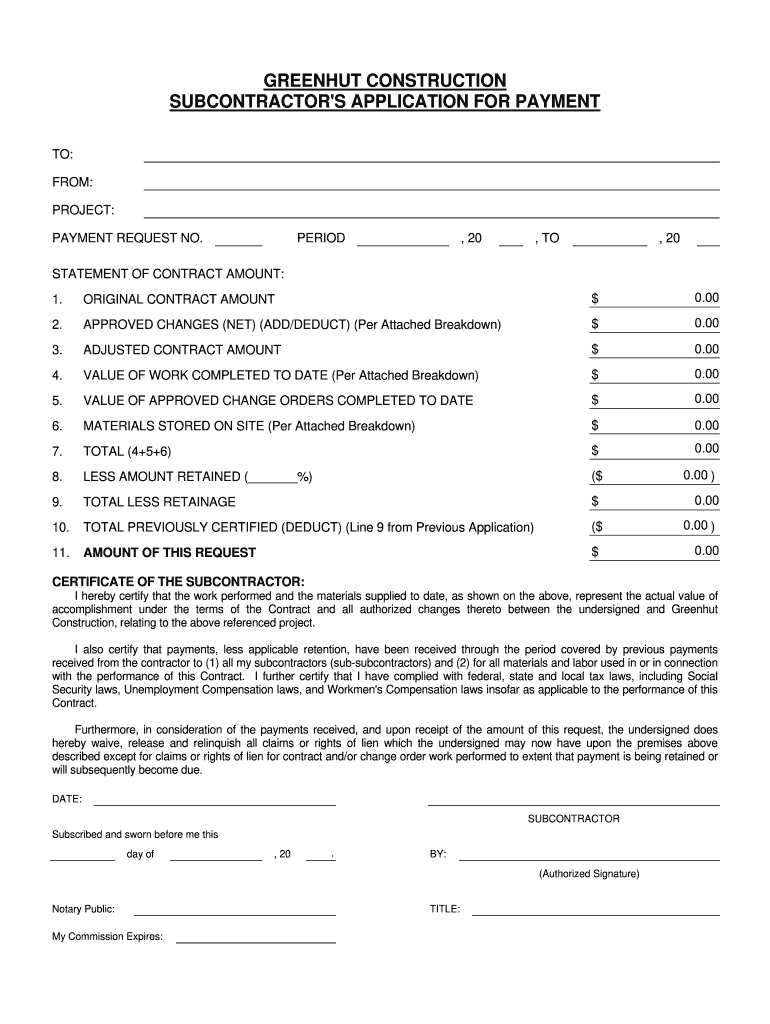
Greenhut Construction Subcontractors Application for Payment free printable template
pdfFiller is not affiliated with any government organization

Fill out
Complete the form online in a simple drag-and-drop editor.

eSign
Add your legally binding signature or send the form for signing.

Share
Share the form via a link, letting anyone fill it out from any device.

Export
Download, print, email, or move the form to your cloud storage.
Why pdfFiller is the best tool for your documents and forms


End-to-end document management
From editing and signing to collaboration and tracking, pdfFiller has everything you need to get your documents done quickly and efficiently.
Accessible from anywhere
pdfFiller is fully cloud-based. This means you can edit, sign, and share documents from anywhere using your computer, smartphone, or tablet.
Secure and compliant
pdfFiller lets you securely manage documents following global laws like ESIGN, CCPA, and GDPR. It's also HIPAA and SOC 2 compliant.
What is Greenhut Construction Subcontractors Application for Payment
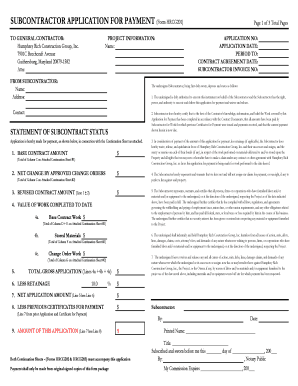
The Subcontractor's Application for Payment is a document used by subcontractors to request payment from contractors for work completed on construction projects.
pdfFiller scores top ratings on review platforms




I love it. I don't have to fill out in writing or typing.
Very helpful. Like that it keeps forms neat and professional. Love the search option.
Who needs Greenhut Construction Subcontractors Application for Payment?
Explore how professionals across industries use pdfFiller.

Greenhut Construction Subcontractors Application for Payment is needed by:
-
Subcontractors seeking timely payment for completed work.
-
Contractors managing construction payments and records.
-
Notary publics verifying signatures on financial documents.
-
Construction project managers overseeing payment processes.
-
Legal professionals advising on contractor-subcontractor agreements.
Comprehensive Guide to Greenhut Construction Subcontractors Application for Payment
What is the Subcontractor's Application for Payment?
The Subcontractor's Application for Payment is a crucial document used in the construction industry, enabling subcontractors to request payment for completed work from contractors. This form is significant as it outlines the contract amount, work completed, and other vital details that facilitate the payment process.
Key fields in the form include the total contract amount, a breakdown of work completed, and materials stored onsite. The accurate completion of this form is essential for ensuring timely payments and maintaining financial flow within construction projects.
Purpose and Benefits of the Subcontractor's Application for Payment
This application serves multiple practical uses and offers several advantages for subcontractors. By utilizing this form, subcontractors can streamline communication with contractors, facilitating prompt payment after services are rendered.
In addition to expediting payment, the application provides legal protections through lien waivers and tax compliance certifications, which help maintain adherence to industry regulations such as subcontractor payment requests.
Who Needs the Subcontractor's Application for Payment?
The Subcontractor's Application for Payment is essential for a variety of professionals in the construction field. This includes subcontractors involved in specialized trades, vendors supplying materials, and other contractors requiring payment documentation.
Subcontractors must submit this application when they have completed work that warrants payment according to the agreed-upon contract terms, ensuring that they receive compensation for their services.
How to Fill Out the Subcontractor's Application for Payment Online
Filling out the Subcontractor's Application for Payment online is a straightforward process. Here’s how to complete the form using pdfFiller:
-
Access the form and enter the 'Statement of Contract Amount' accurately.
-
Complete the 'Certificate of the Subcontractor' to confirm compliance.
-
Incorporate digital signatures as required and ensure notarization is conducted properly.
By following these steps, subcontractors can efficiently submit their applications and ensure all required fields are completed correctly.
Common Errors and How to Avoid Them
When completing the subcontractor application, users often encounter several common mistakes. These include inaccuracies in the contract amount, neglecting to sign the document, and failing to complete required certifications.
To avoid these errors, it is essential to double-check all entries for accuracy and completeness before submitting the form. Ensure that all fields are filled in, and remember to include necessary signatures and notarization.
Payment Methods and Submission Guidelines for the Subcontractor's Application for Payment
Subcontractors have several options when it comes to submitting the Subcontractor's Application for Payment. These methods include:
-
Online submission via platforms such as pdfFiller.
-
Mailing the form directly to the contractor's office.
-
Delivering the form in person to ensure it is received.
Each submission method may have associated fees, deadlines, and processing times that should be carefully reviewed to ensure timely payments.
What Happens After You Submit the Subcontractor's Application for Payment?
After submitting the application, subcontractors can expect specific confirmation processes and status tracking options. Typically, users receive a confirmation notification once the application has been submitted successfully.
There are several possible outcomes following submission, including acceptance, further requests for information, or rejection. Understanding these outcomes can prepare subcontractors for any necessary follow-up actions.
Security and Compliance for the Subcontractor's Application for Payment
Security is paramount when dealing with the Subcontractor's Application for Payment. pdfFiller employs robust security measures, including 256-bit encryption and compliance with HIPAA and GDPR standards, to ensure the safe handling of sensitive data.
Protecting this information is critical, as it contains personal and financial details that must be safeguarded throughout the submission process.
Utilizing pdfFiller for Your Subcontractor's Application for Payment
pdfFiller offers unique features designed to simplify the completion of the Subcontractor's Application for Payment. Users can easily edit, sign, and submit the form online, providing a convenient solution for busy subcontractors.
Additional functionalities, such as eSigning capabilities and document storage, enhance the overall user experience, making pdfFiller a valuable tool for managing construction-related paperwork effectively.
Sample Completed Subcontractor's Application for Payment
A sample completed Subcontractor's Application for Payment serves as a useful reference for subcontractors. This visual representation provides guidance on filling out the form correctly and highlights key fields that are essential for successful completion.
By studying an annotated example, users can gain insights into what information is necessary and how to ensure their application meets industry standards.
How to fill out the Greenhut Construction Subcontractors Application for Payment
-
1.To access the Subcontractor's Application for Payment, navigate to pdfFiller's website and log into your account. Use the search bar to find the form by typing its name.
-
2.Once you locate the form, click on it to open it in the pdfFiller editor. Familiarize yourself with the layout and available tools.
-
3.Before filling out the form, gather essential information such as the total contract amount, details about work completed, and materials stored on-site.
-
4.Begin completing the necessary fields in the document. Click on text boxes to enter information directly. Use checkboxes where required based on your situation.
-
5.Ensure to address sections like the 'STATEMENT OF CONTRACT AMOUNT' and 'CERTIFICATE OF THE SUBCONTRACTOR' to include compliance statements and waivers.
-
6.After entering all required information, carefully review the form for accuracy. Verify that all fields are properly filled out, and check for any missing signatures.
-
7.Once satisfied with your entries, finalize the document by clicking on the save button. Choose the appropriate option to download the file or submit it via email through pdfFiller.

Who is eligible to use the Subcontractor's Application for Payment?
Typically, any subcontractor who has completed work under a contract on a construction project can use this form to request payment from the contractor.
What supporting documents are required when submitting this form?
You may need to include documentation such as proof of completed work, invoices, and any relevant change orders to substantiate your payment request.
Is there a deadline for submitting the Subcontractor's Application for Payment?
Deadlines vary based on the contract terms. It's important to submit your application promptly to ensure timely payment according to the agreed schedule.
Can this form be submitted electronically?
Yes, once completed with all required signatures, the Subcontractor's Application for Payment can be submitted electronically through pdfFiller or printed out as needed.
What are common mistakes to avoid when filling out this form?
Common errors include not signing the form, leaving required fields blank, and failing to notarize the document when necessary. Review all sections thoroughly before submission.
How long does it take for payment requests to be processed?
Processing times for payment requests depend on the contractor's policies and workload but generally take a few days to a couple of weeks after submission.
What happens if I need to make changes after submitting my application?
If changes are necessary, contact the contractor promptly to discuss the request. Depending on their policy, you may need to submit a revised request.
Related Content
Related Forms



Related Catalogs
Get the latest insights from our blog


If you believe that this page should be taken down, please follow our DMCA take down process
here
.
This form may include fields for payment information. Data entered in these fields is not covered by PCI DSS compliance.